Medium 15-35 min PLAPETGTPUABSASA
Under-Extrusion
Printed lines look thin or incomplete, with gaps in walls, sparse top surfaces, or weak layers.
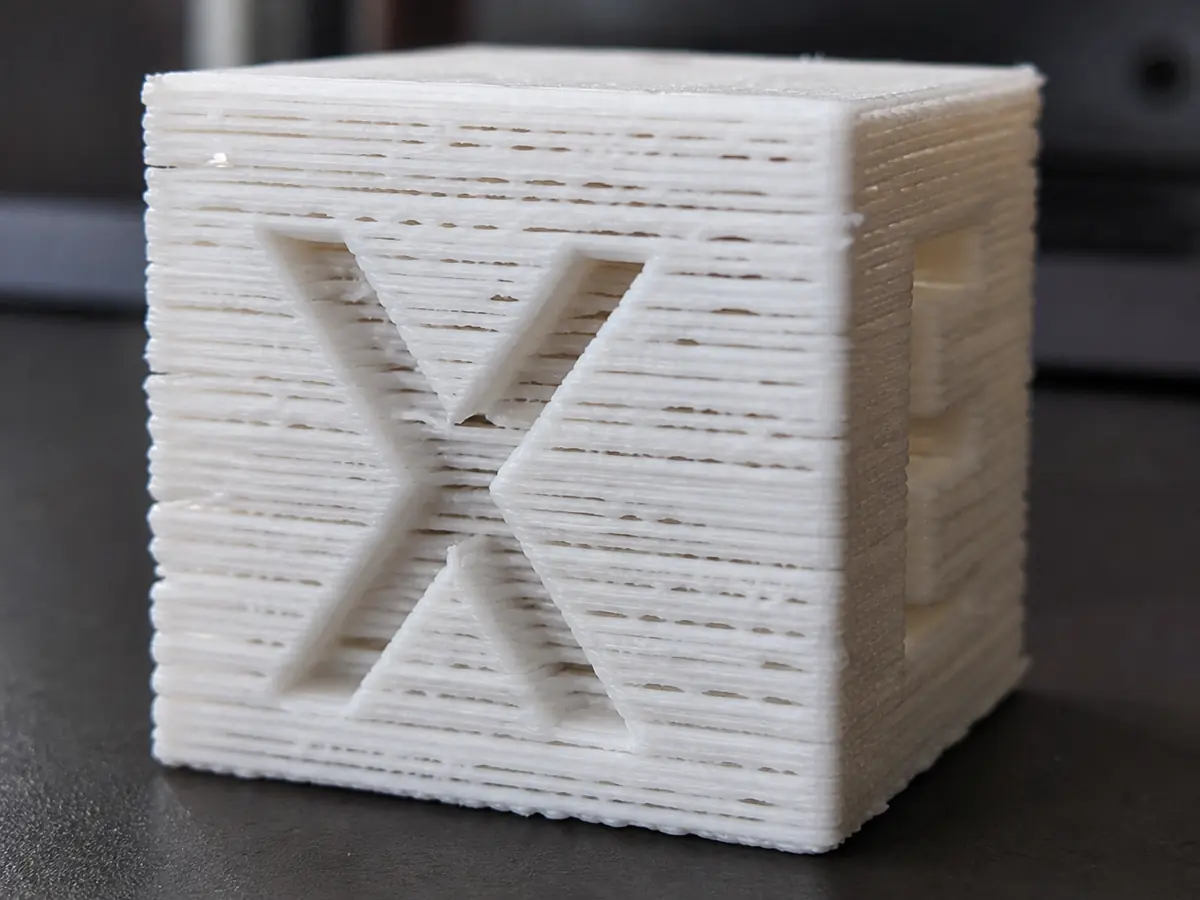
Likely causes
Partial nozzle clog
Perform a cold pull or nozzle cleaning. If the issue started after abrasive or old filament, inspect or replace the nozzle.
Filament path has too much resistance
Check spool drag, tangled filament, PTFE tube bends, and extruder tension. TPU is especially sensitive to resistance.
Printing too cold or too fast
Raise nozzle temperature by 5 C steps or lower speed so the hotend can melt enough plastic.
Recommended settings by material
| Material | Nozzle | Bed | Fan |
|---|---|---|---|
| PLA | 195-210 C | 50-60 C | 80-100% |
| PETG | 230-245 C | 70-80 C | 30-60% |
| TPU | 220-235 C | 40-50 C | 30-50% |
| ABS | 240-260 C | 95-110 C | 0-30% |
| ASA | 240-260 C | 95-110 C | 0-30% |
Prevention tips
Change one setting at a time and reprint a small test piece.
Keep filament dry and store open spools in sealed bags or dry boxes.
Clean the build plate regularly and verify the correct slicer profile before long prints.
Related problems
Last reviewed Jun 15, 2026. Troubleshooting content is for reference only.