Medium 15-40 min PLAPETGTPUABSASA
Rough Surface
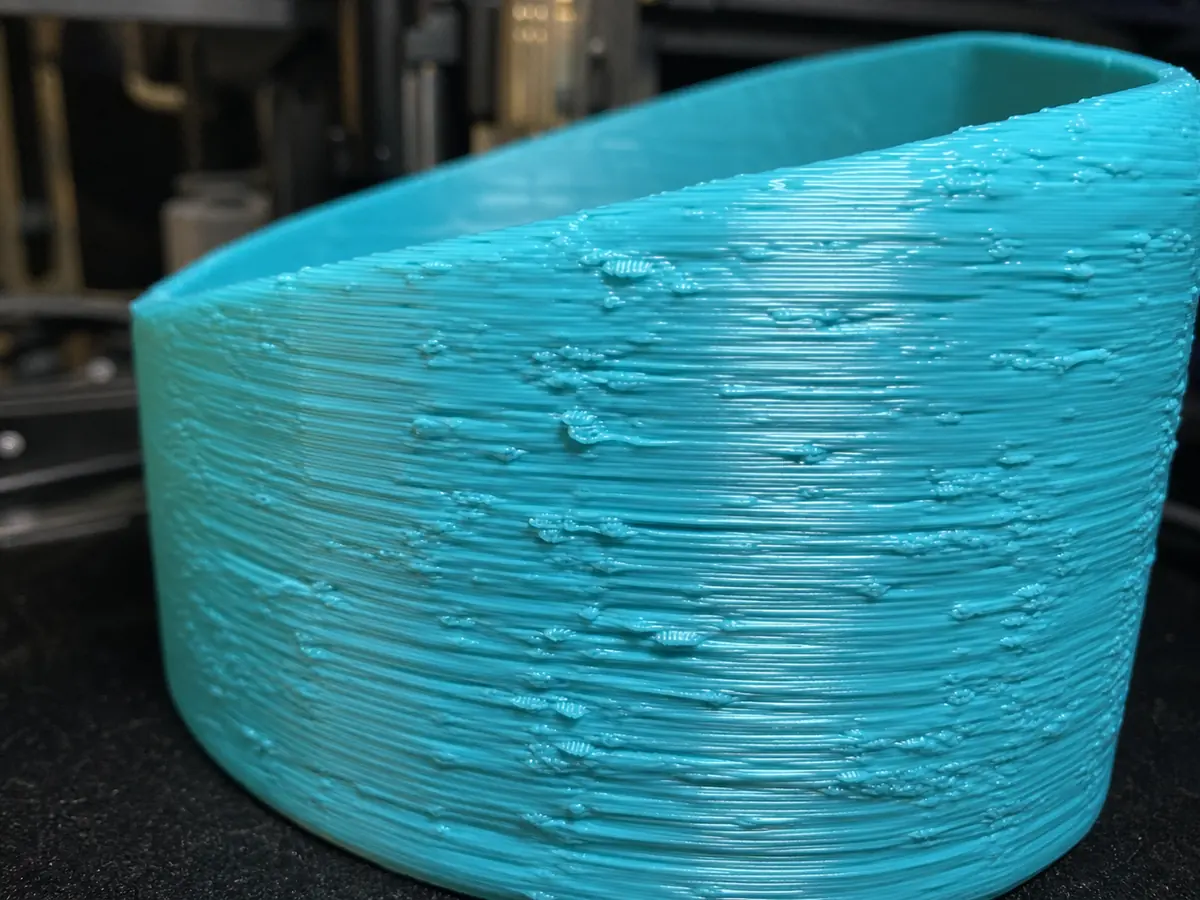
The visible surface looks uneven, scratched, bumpy, or inconsistent.
Likely causes
Filament is wet or inconsistent
Dry the filament and test with a known-good spool. Moisture often causes popping and rough texture.
Speed is too high for the material
Lower outer wall speed and acceleration. Give the hotend and motion system more time to produce clean lines.
Flow or temperature is not tuned
Tune temperature and flow with small test parts before changing many slicer settings at once.
Recommended settings by material
| Material | Nozzle | Bed | Fan |
|---|---|---|---|
| PLA | 195-210 C | 50-60 C | 80-100% |
| PETG | 230-245 C | 70-80 C | 30-60% |
| TPU | 220-235 C | 40-50 C | 30-50% |
| ABS | 240-260 C | 95-110 C | 0-30% |
| ASA | 240-260 C | 95-110 C | 0-30% |
Prevention tips
Change one setting at a time and reprint a small test piece.
Keep filament dry and store open spools in sealed bags or dry boxes.
Clean the build plate regularly and verify the correct slicer profile before long prints.
Related problems
Last reviewed Jun 15, 2026. Troubleshooting content is for reference only.