Medium 15-35 min PLAPETGTPUABSASA
Layer Shift
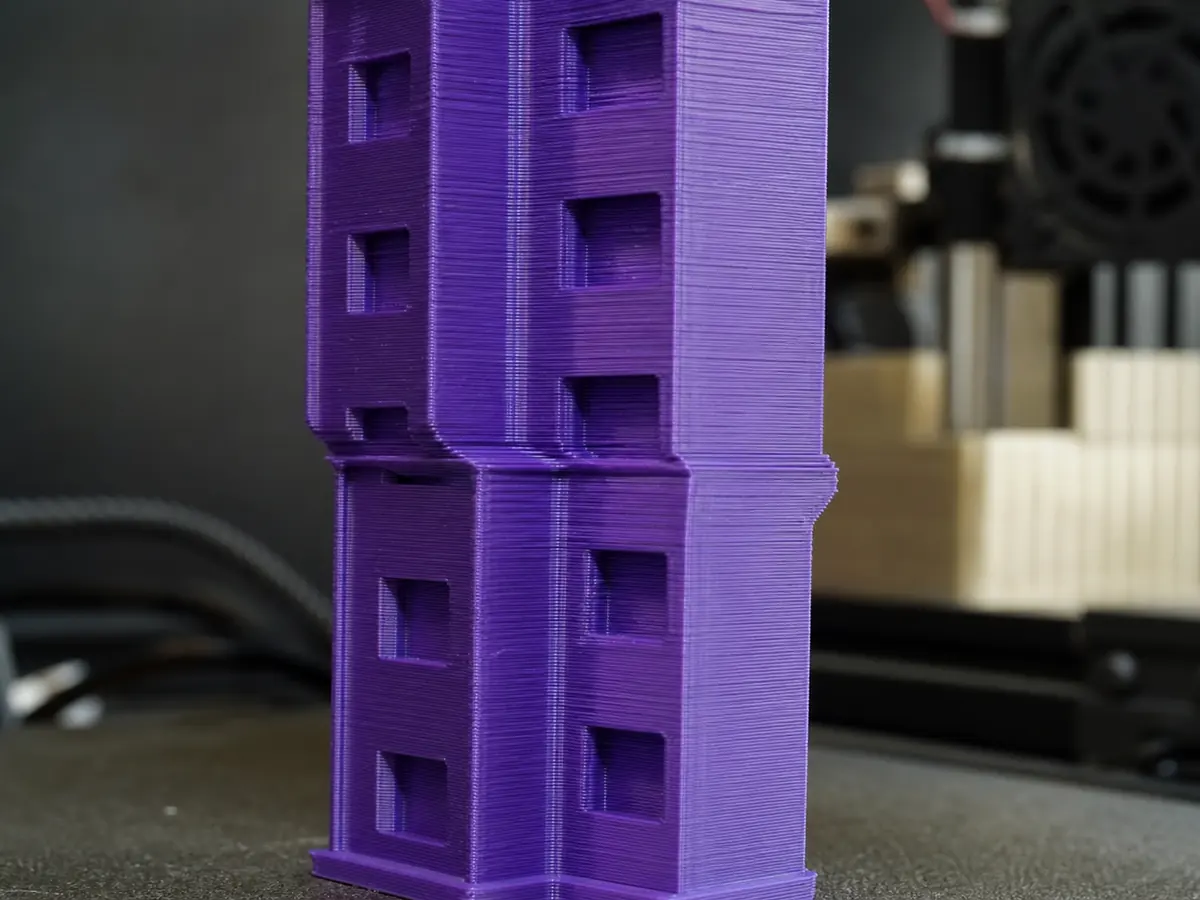
Upper layers suddenly shift in X or Y, creating a stepped print.
Likely causes
Belt tension or pulley problem
Check belt tension and make sure pulley grub screws are tight on the motor shaft flat.
Toolhead collision
Look for curled edges, blobs, or supports that the nozzle may hit. Enable Z hop only if it helps without causing stringing.
Acceleration is too aggressive
Lower acceleration and jerk, especially on tall or heavy moving-bed prints.
Recommended settings by material
| Material | Nozzle | Bed | Fan |
|---|---|---|---|
| PLA | 195-210 C | 50-60 C | 80-100% |
| PETG | 230-245 C | 70-80 C | 30-60% |
| TPU | 220-235 C | 40-50 C | 30-50% |
| ABS | 240-260 C | 95-110 C | 0-30% |
| ASA | 240-260 C | 95-110 C | 0-30% |
Prevention tips
Change one setting at a time and reprint a small test piece.
Keep filament dry and store open spools in sealed bags or dry boxes.
Clean the build plate regularly and verify the correct slicer profile before long prints.
Related problems
Last reviewed Jun 15, 2026. Troubleshooting content is for reference only.