Medium 15-30 min PLAPETGTPUABSASA
Infill Showing Through
The infill pattern is visible through outer walls or top surfaces.
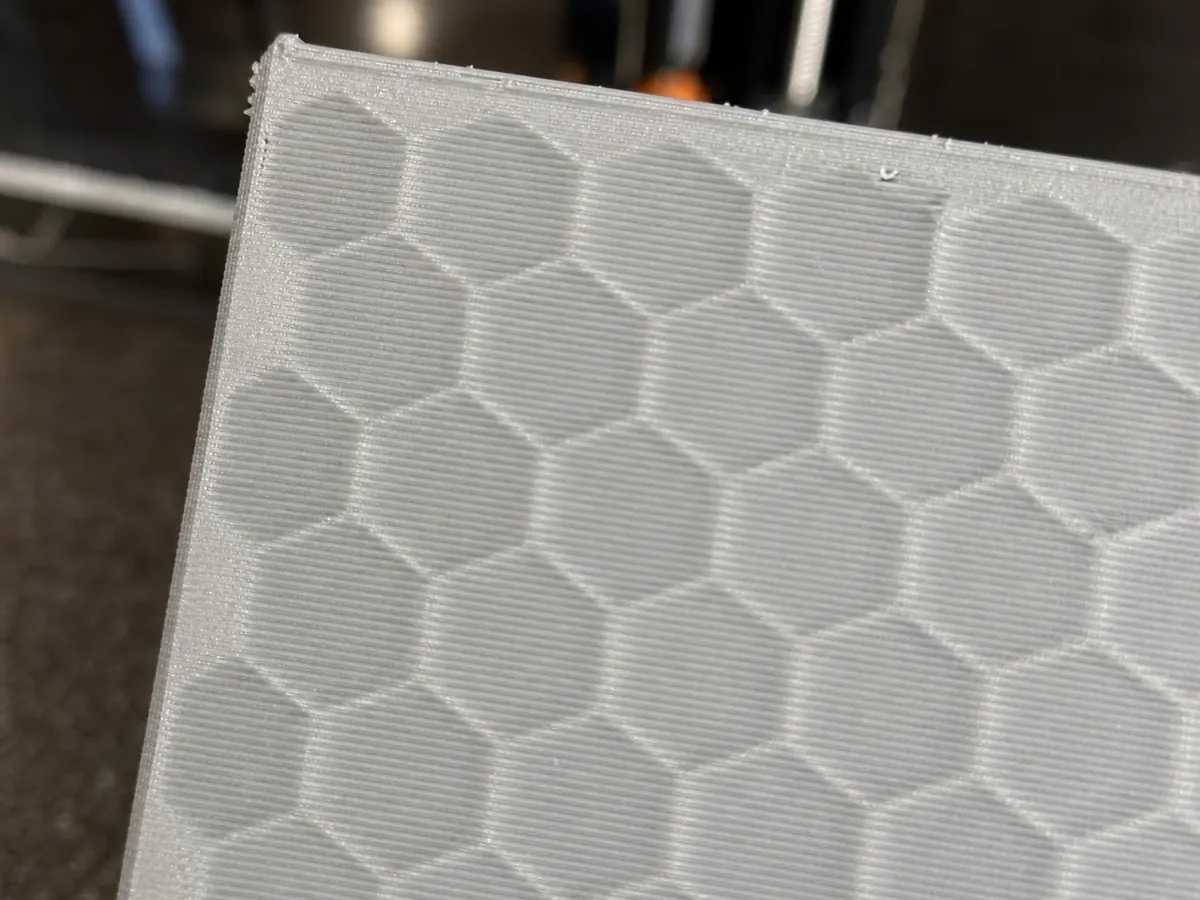
Likely causes
Wall count is too low
Increase wall loops or perimeter count so infill is hidden behind more plastic.
Infill overlap is too high
Reduce infill-wall overlap if the pattern is pushing through the outer wall.
Top layers are too thin
Increase top shell thickness to hide infill on horizontal surfaces.
Recommended settings by material
| Material | Nozzle | Bed | Fan |
|---|---|---|---|
| PLA | 195-210 C | 50-60 C | 80-100% |
| PETG | 230-245 C | 70-80 C | 30-60% |
| TPU | 220-235 C | 40-50 C | 30-50% |
| ABS | 240-260 C | 95-110 C | 0-30% |
| ASA | 240-260 C | 95-110 C | 0-30% |
Prevention tips
Change one setting at a time and reprint a small test piece.
Keep filament dry and store open spools in sealed bags or dry boxes.
Clean the build plate regularly and verify the correct slicer profile before long prints.
Related problems
Last reviewed Jun 15, 2026. Troubleshooting content is for reference only.