Medium 15-30 min PLAPETGABSASA
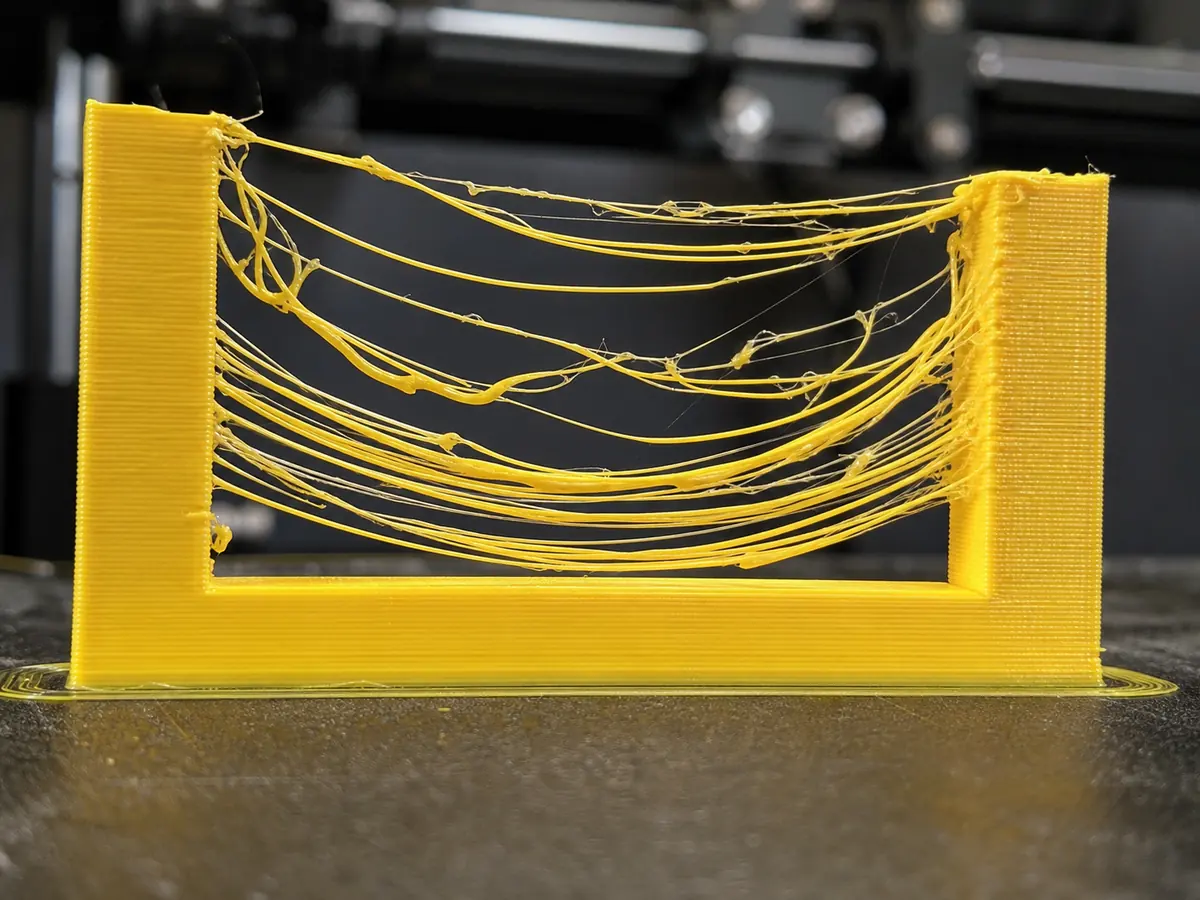
Poor Bridging
Plastic sags or droops when printing across open gaps without support.
Likely causes
Bridge speed or flow is wrong
Use slicer bridge settings. Lower bridge flow slightly and use a moderate bridge speed so strands stretch cleanly.
Cooling is insufficient
Increase fan for bridges, especially with PLA. PETG may need a balance between cooling and layer adhesion.
Bridge distance is too long
Reorient the model, add support, or split the part if the unsupported span is too large.
Recommended settings by material
| Material | Nozzle | Bed | Fan |
|---|---|---|---|
| PLA | 195-210 C | 50-60 C | 80-100% |
| PETG | 230-245 C | 70-80 C | 30-60% |
| TPU | 220-235 C | 40-50 C | 30-50% |
| ABS | 240-260 C | 95-110 C | 0-30% |
| ASA | 240-260 C | 95-110 C | 0-30% |
Prevention tips
Change one setting at a time and reprint a small test piece.
Keep filament dry and store open spools in sealed bags or dry boxes.
Clean the build plate regularly and verify the correct slicer profile before long prints.
Related problems
Last reviewed Jun 15, 2026. Troubleshooting content is for reference only.